Local-First AI App Case Study
Travel Partner
A travel planning workspace that turns rough trip constraints into editable day plans, budget checks, and saved places before cloud sync is required.
This public rebuild frames the TripBase pattern as a safer product story: useful planning starts locally, AI generation stays behind a server route, and cloud persistence only becomes production storage after auth and row-level ownership are real. The interactive demo uses a fake Osaka trip and fake budget items only; the screenshots are captured from the real TripBase UI with sanitized local seed data.
Product signal
Useful before login
The strongest decision is product scope discipline: travelers can draft a plan immediately, while private storage and AI-key boundaries stay conservative.
Storage mode
Local by default
Missing env vars or missing session route planner data to browser storage instead of anonymous cloud writes.
AI boundary
Server route only
The browser sends trip constraints, not provider credentials. Generation logic belongs behind the server boundary.
Cloud posture
Auth + RLS later
Supabase persistence is treated as production storage only after authenticated ownership rules are in place.
App screenshots
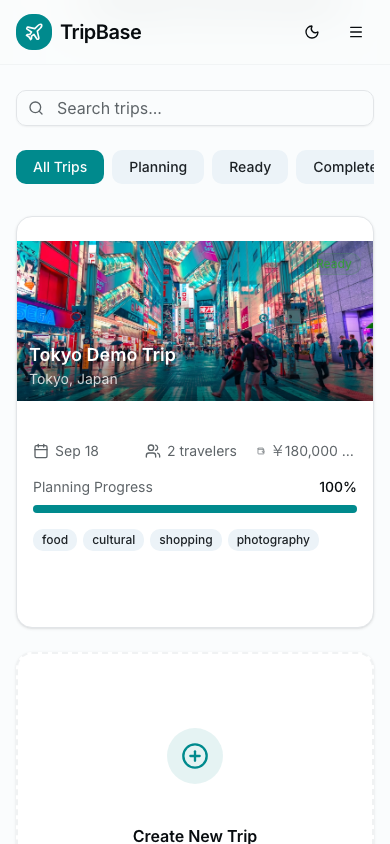
Real TripBase dashboard captured from a sanitized local seed, showing the mock trip card and destination image.
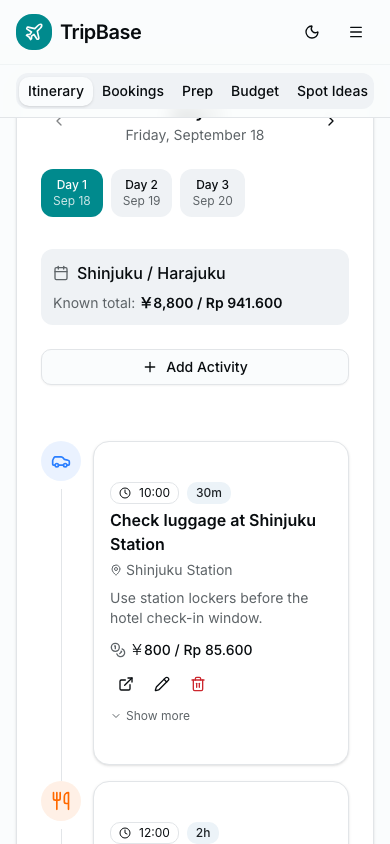
Real TripBase itinerary timeline captured with mock data, keeping day plans editable before cloud sync.
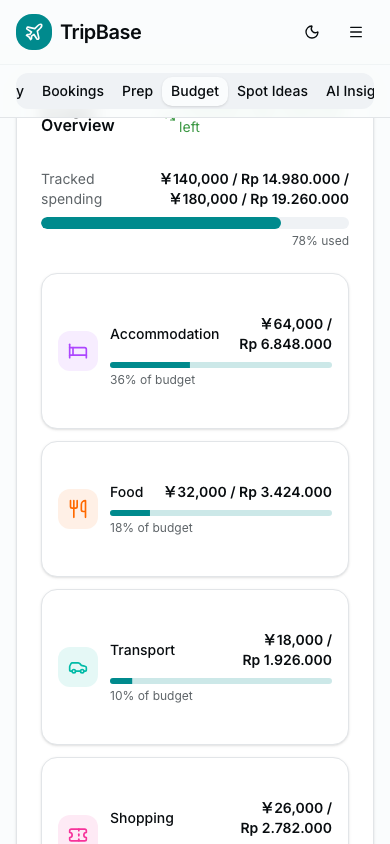
Real TripBase budget surface captured with fake Tokyo expenses and local-only seed data.
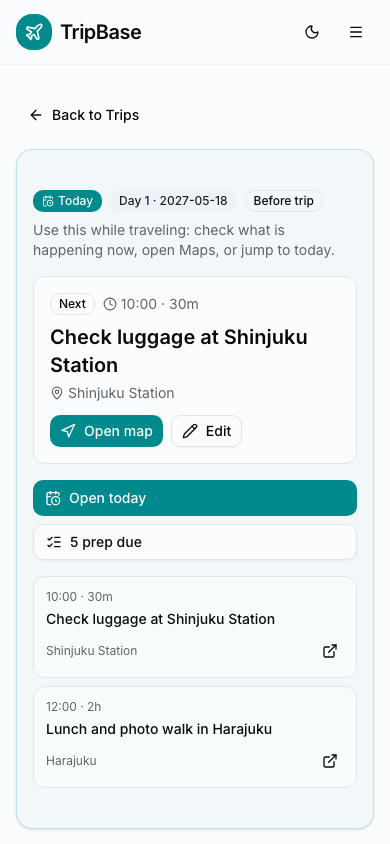
Real TripBase today mode captured with fake Tokyo data, map action, and prep alert visible.
01
Problem
Trip planning often starts before a user is ready to create an account. The product needed to support messy early planning, rough budgets, saved places, and itinerary edits without forcing cloud persistence too early or making AI output feel like a final answer.
02
Constraints
The MVP had to stay useful with no auth session, avoid exposing AI provider credentials to the browser, and keep future cloud sync possible without changing the planning model later.
- Anonymous users should be able to draft a trip locally
- Provider keys and generation prompts belong in server-side code
- Cloud writes are unsafe until user ownership is enforced
- Collaboration, public sharing, booking, and payments stay out of MVP
03
Approach
The planning model separates trip profile, days, itinerary items, expenses, and saved places. That keeps the UI useful in local mode while leaving a clean path to authenticated persistence once auth and ownership policies are ready.
- Trip profile captures dates, base area, traveler style, and budget comfort
- Generated itinerary items remain editable instead of becoming locked AI output
- Budget and saved-place panels sit next to the timeline so planning tradeoffs are visible
- The public demo uses fake places and simulated generation only
04
Feature Coverage
The public portfolio intentionally shows a safe representative slice of the real app. It demonstrates the product shape without exposing private trip details or pretending every production-only surface belongs in a public demo.
Local draft planning
- Public surface
- Runnable fake-data demo plus real UI dashboard screenshot
- Full app status
- Included in the public slice
Editable itinerary timeline
- Public surface
- Real UI screenshot and simplified interactive demo
- Full app status
- Included in the public slice
Today mode and prep alerts
- Public surface
- Real UI screenshot with fake Tokyo data
- Full app status
- Shown as product evidence, not rebuilt as an interactive demo
Budget tracking
- Public surface
- Real UI screenshot plus fake budget panel in the demo
- Full app status
- Included in the public slice
Bookings, imports, and payment state
- Public surface
- Explained in coverage, omitted from public interaction
- Full app status
- Full app surface, intentionally not exposed in the portfolio demo
Spot ideas and AI advisor
- Public surface
- Described as a full-app capability
- Full app status
- Kept out of the MVP demo to avoid scope creep
Cloud sync, auth, and sharing
- Public surface
- Covered through the storage and RLS boundary story
- Full app status
- Production path only after authenticated ownership is real
| Feature | Public surface | Full app status |
|---|---|---|
| Local draft planning | Runnable fake-data demo plus real UI dashboard screenshot | Included in the public slice |
| Editable itinerary timeline | Real UI screenshot and simplified interactive demo | Included in the public slice |
| Today mode and prep alerts | Real UI screenshot with fake Tokyo data | Shown as product evidence, not rebuilt as an interactive demo |
| Budget tracking | Real UI screenshot plus fake budget panel in the demo | Included in the public slice |
| Bookings, imports, and payment state | Explained in coverage, omitted from public interaction | Full app surface, intentionally not exposed in the portfolio demo |
| Spot ideas and AI advisor | Described as a full-app capability | Kept out of the MVP demo to avoid scope creep |
| Cloud sync, auth, and sharing | Covered through the storage and RLS boundary story | Production path only after authenticated ownership is real |
05
Local-first Storage
Local-first is the product default until the trust boundary is complete. If Supabase browser config is absent, or if a user session is missing, the app stores trip drafts locally. Authenticated cloud storage becomes the production path only after user-owned rows can be enforced.
- local_missing_env stores drafts in localStorage
- local_unauthenticated also stays local, even if browser-safe Supabase config exists
- supabase_authenticated is the only production cloud storage mode
- Trip child rows inherit access through the parent trip owner
06
AI Boundary
AI generation is treated as an assistant, not the product's source of truth. The browser sends structured constraints to a server route; the server calls the provider and returns a draft plan that the user can edit, reject, or save locally.
- Provider credentials never use public browser env names
- Generated plans are labeled as drafts and remain editable
- The app can degrade to manual planning if generation is unavailable
- No itinerary export, share link, or booking flow is included in the MVP
07
Outcome
The Travel Partner story shows product judgment and security judgment at the same time. The app starts with a low-friction planning loop, but it does not pretend auth, RLS, cloud sync, collaboration, or bookings are solved before they actually are.
Continue Exploring
LINE Workflow Bridge is also live.
Each case study covers a different part of the stack — see how the same engineering principles show up across different problem types.